 BlockMap
Turn any real place into a Minecraft world
Search your street, your school or a famous landmark. About a minute later, walk through it block by block, with real roads, buildings, rivers and hills from open map data.


Free to download on iPhone, iPad and Android. Your first world is free.
Famous places, block by block
Each of these worlds was made by the app and filmed in Minecraft. Search the same name in BlockMap to get it yourself.
 Video tour · 8 stops · 6 flyovers
 Video tour · 5 stops
 Video tour · 5 stops
From a search to a Minecraft world in about a minute
No PC, mods or commands. Everything happens in the app on your phone.
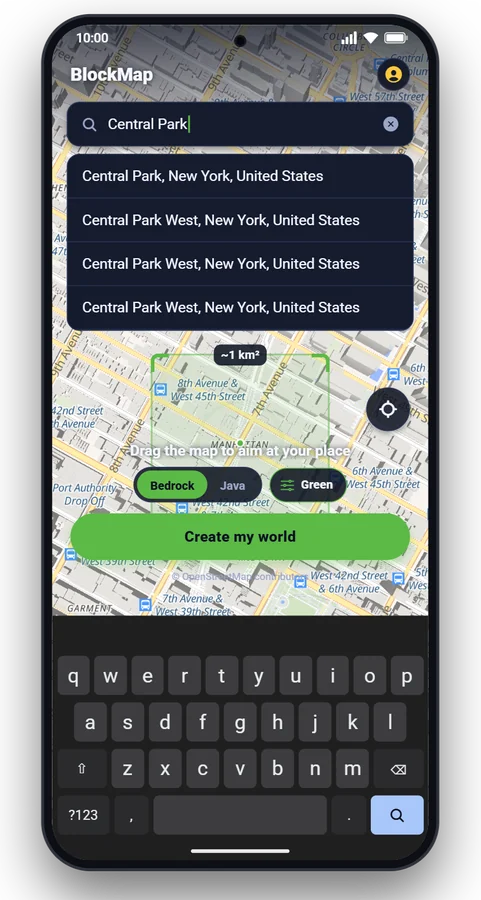
Search any place
Type an address, a landmark or a city, or drag the map. Your street works as well as the Eiffel Tower.
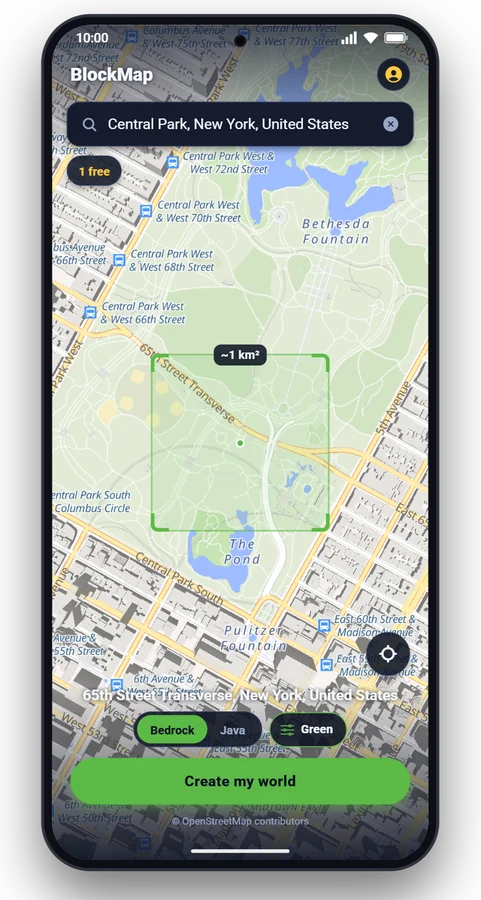
Aim the square
The green square is the 1 km² that becomes your world. Pick Bedrock or Java, real terrain on or off.
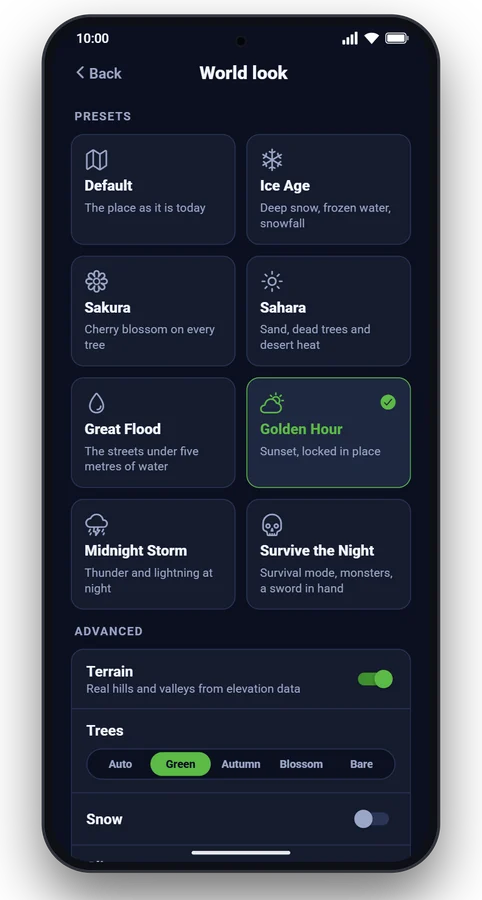
Choose a look
Keep it as it is today, or make it snow, flood the streets or freeze the sun at golden hour.
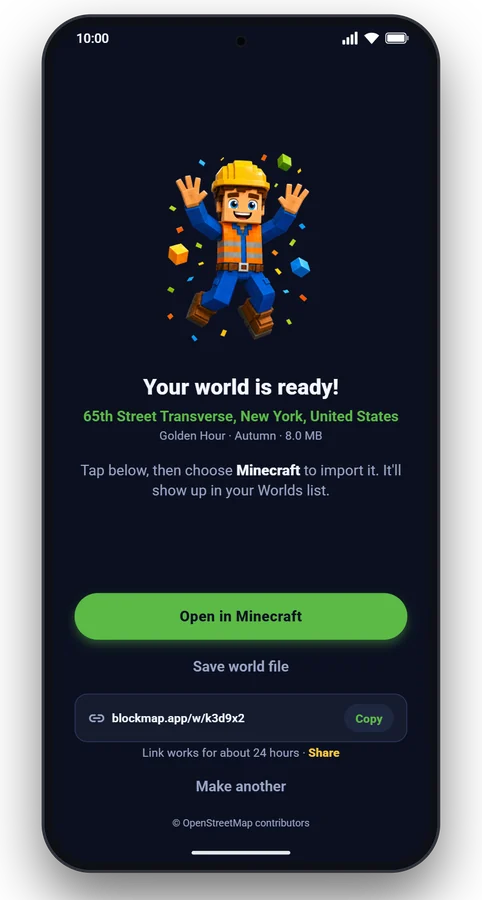
Open it in Minecraft
One tap opens the world in Minecraft. Or copy a download link for your PC or a friend.
The same place, eight ways
Pick a look before you tap Create. Some combine: flood the streets, add Ice Age, and the flood freezes over.
What people build with it
Your street or your house
Walk around a block version of your own neighbourhood. Places that are well mapped in OpenStreetMap come out with the most detail.
Your school or campus
Schools get their name on a sign, a flag, and classrooms with lockers and boards, on top of their real building shapes.
A city to explore
Skylines like London, New York or Dubai at real height, with their rivers, parks and bridges. The tallest towers stop at Minecraft's height limit.
Survival and roleplay maps
Start a survival or roleplay world in a place you know. Survive the Night switches on survival mode and monsters, with a sword in hand.
Famous landmarks
Some famous places come with extra detail: the Titanic with rooms inside, the pyramids of Giza with their passages, and more.
School projects
Real streets, real heights and real terrain make a city or a landscape easy to explore and explain in geography or history lessons.
Bedrock or Java, your choice
Phones, tablets, Windows
Bedrock Edition
The app hands the world (a .mcworld file) to Minecraft, which adds it to your worlds list. You can also save the file or send a download link to a Windows PC.
PC and Mac
Java Edition
Choose Java before you create the world, copy its download link, open it on your computer and unzip the folder into your Minecraft saves folder. Needs Java Edition 1.21.4 or newer.
Questions people ask
Do I need Minecraft?
Yes. BlockMap makes the world; you play it in your own copy of Minecraft. Bedrock worlds open on phones, tablets and Windows. Java worlds need Minecraft Java Edition 1.21.4 or newer on a PC or Mac.
Does it work with Minecraft Pocket Edition on my phone?
Yes. Pocket Edition is now called Bedrock Edition, the Minecraft on phones and tablets. The app opens the finished world in Minecraft with one tap, and it appears in your worlds list.
Can I put my own house, street or school into Minecraft?
Yes, search the address and aim the square at it. Buildings, roads, parks and water come from OpenStreetMap, so places that are well mapped there come out with the most detail. Most buildings get rooms inside, and schools get a sign, a flag and classrooms.
How big is a world?
About 1 km by 1 km around the place you choose, at real scale: one block is one metre, so a 100 m tower is 100 blocks tall. The tallest skyscrapers stop at Minecraft's height limit.
How long does it take?
Usually under a minute. Most worlds are ready in 10 to 30 seconds.
Can I play the world on a PC?
Yes. Every world has a download link: copy it in the app and open it on your computer. Bedrock worlds import into Minecraft for Windows; Java worlds unzip into your saves folder. Links work for about 24 hours.
Does it work on Xbox, PlayStation or Switch?
Consoles cannot open world files directly. One way is to import the world on a phone or Windows PC first and upload it to a Minecraft Realm, which consoles can join.
Is it free?
Your first world is free. After that you can make a free world every 8 hours, or subscribe for unlimited worlds. You can cancel the subscription at any time in your app store.
Where does the map data come from?
OpenStreetMap contributors, with building data from the Overture Maps Foundation, land cover from ESA WorldCover, tree canopy from Meta and WRI, and elevation from the GEDTM30 terrain model. Worlds are built by the open-source Arnis engine.
Do you keep my worlds?
No. World files are deleted about a day after they are made. Save the file or import it into Minecraft to keep it.
Your first world is free
Search a place, tap Create, play it in Minecraft.